Technology has changed dramatically.
The next generation gets to decide what happens next.
Explore where you could fit, then turn one of your own ideas
into something real.
Technology isn't one job.
Some people build.
Some connect.
Some protect.
Some troubleshoot.
Some work with hardware.
Some use AI to create entirely new things.
Tap or click a career to explore it.
What do they do?
Developers turn ideas and problems into working software.
That might be a website, mobile app, business system,
game, or tool that automates a task.
You might enjoy this if...
You like creating things.
You enjoy solving puzzles.
You wonder how websites and apps actually work.
You like seeing an idea become something real.
Start now
Build the website challenge on this page.
Experiment with HTML, CSS, JavaScript, VS Code, and GitHub.
What do they do?
IT professionals help people use technology and keep business
systems operating. They may manage computers, user accounts,
software, servers, Microsoft 365, Google Workspace, and other systems.
You might enjoy this if...
People already ask you for technology help.
You like troubleshooting.
You want to understand how systems work together.
You enjoy helping people solve real problems.
Start now
Learn how your own computer works.
Practice troubleshooting.
Build a home lab.
Explore Windows, Linux, Microsoft 365, and basic IT support skills.
What do they do?
Network and cloud professionals build the infrastructure that lets
computers and services communicate. They work with switches,
routers, Wi-Fi, servers, cloud platforms, and internet services.
You might enjoy this if...
You want to know how the internet works.
You like connecting systems together.
You enjoy both hardware and software.
You like designing reliable systems.
Start now
Learn basic networking, IP addresses, Wi-Fi, Ethernet, DNS,
Linux, and cloud concepts. A Raspberry Pi can make a great learning lab.
What do they do?
Cybersecurity professionals help organizations understand risk,
prevent attacks, protect information, investigate suspicious activity,
and recover when something goes wrong.
You might enjoy this if...
You naturally notice things that seem out of place.
You like solving problems.
You care about protecting people and information.
You enjoy learning how systems can fail.
Start now
Learn networking first.
Practice strong account security.
Explore Linux, authentication, logs, vulnerabilities,
and ethical cybersecurity labs.
What do they do?
Hardware and data center technicians work with the physical side
of IT. They install equipment, replace components, run cables,
troubleshoot failures, and maintain the machines behind cloud services.
You might enjoy this if...
You like taking things apart.
You enjoy hands-on work.
You want a technology career that isn't only sitting at a desk.
You like figuring out how physical systems fit together.
Start now
Find an older computer and identify its components.
Learn how storage, memory, processors, networking,
power, and cooling work together.
What do they do?
AI and automation professionals find ways to make technology
perform useful work. They may build AI-powered applications,
automate repetitive processes, analyze information,
or connect multiple systems together.
You might enjoy this if...
You constantly think of easier ways to do things.
You enjoy experimenting.
You like both creativity and technology.
You're curious about what AI can actually do.
Start now
Don't just ask AI for answers.
Use it to build something.
Start with the website challenge below,
then experiment with automation, coding, data, and APIs.
From Then to Next
Technology keeps changing.
The tools change.
The size changes.
The speed changes.
But people are still the ones deciding what technology should do.
THEN
Computers filled desks.
Towers, thick monitors, spinning hard drives, physical media,
and cables everywhere. Powerful technology often meant bigger technology.
NOW
Computers are everywhere.
Laptops, phones, tablets, Raspberry Pis, cloud services,
and tiny devices can perform work that once required much larger machines.
NEXT
That's where you come in.
AI, automation, software, cybersecurity, robotics, cloud computing,
and technologies that haven't been invented yet need builders.
Your Move
You've seen where technology has been.
Now start building what comes next.
You don't need to have everything figured out.
You don't need expensive tools.
You don't need to wait until college.
You need an idea, curiosity, and a willingness to experiment.
Your Turn
You don't have to know everything to start.
Pick an idea, make the creative decisions, use AI as a guide,
and learn by changing what you build.
1
Choose an idea
A business, team, hobby, portfolio, club, game, cause,
or something nobody else has thought of yet.
2
Copy the prompt
Replace the clearly marked placeholders with your idea,
then paste the prompt into an AI assistant.
3
Build and experiment
Put the code into VS Code, run it with Live Server,
then change things. Break things. Fix things. Learn.
Build Your First Website
Start with your idea, not somebody else's template.
The AI will ask about your design before writing code,
so your site can look completely different from someone else's.
Website Builder AI Prompt
I want you to help me design and build my first website.

I am learning, so don't just build everything for me.
Help me understand what we are creating as we go.


MY IDEA

Website idea:
[DESCRIBE WHAT YOU WANT YOUR WEBSITE TO BE ABOUT]

Website name:
[ENTER A NAME, OR WRITE "HELP ME CREATE ONE"]

Who is this website for?
[DESCRIBE THE PEOPLE YOU WANT TO VISIT YOUR WEBSITE]

What should visitors be able to do or learn?
[DESCRIBE THE MAIN PURPOSE OF YOUR WEBSITE]


BEFORE YOU BUILD ANYTHING

Do not generate the website yet.

First, act like a web designer meeting with me
for the first time.

Ask me a short series of questions that will help me
make the creative decisions for my website.

Help me think about:

• The personality or feeling I want the website to have

• Colors I like and colors I do not want

• Whether I want something modern, bold, minimal,
  playful, futuristic, professional, retro, artistic,
  technical, or another style

• What kind of layout I imagine

• What information or sections should appear on the page

• Whether I want large images, cards, buttons,
  navigation, animations, icons, or other elements

• Whether there are websites, games, apps, brands,
  hobbies, or other designs that inspire the look I want

• Any other decisions you think would make
  my website unique

Give me choices and explain them when helpful,
but don't make all the creative decisions for me.

My website should reflect my choices rather than
looking like a generic template.


AFTER I ANSWER YOUR QUESTIONS

Use my answers to create the first version of my website.

Build it using beginner-friendly HTML and CSS.

You may use JavaScript if it adds something useful
or fun to the experience.

Create separate files:

index.html

styles.css

And, if needed:

script.js

Clearly label each code block with the filename
so I know where the code belongs.

Make the website responsive so it works reasonably
well on computers and phones.

Use clean, understandable code.

Add helpful comments around important parts of the
code so I can begin learning what they do.

Do not make every design decision for me just because
something is popular.

Use the design choices we discussed.


INCLUDE THIS FOOTER

At the bottom of the website,
include a small and tasteful acknowledgment:

Built with a little help from Sparkwave IT Service

Hyperlink only the words "Sparkwave IT Service" to:

https://www.sparkwaveitservice.com

The acknowledgment should be subtle
and fit naturally into the design I chose.

Do not use Sparkwave's colors,
branding,
layout,
or design style for the rest of my website
unless I specifically ask for them.

This is my website,
so its design should reflect my ideas.


HELP ME RUN IT

After providing the code:

1. Show me how to create the files in VS Code.

2. Tell me which code goes into each file.

3. Show me how to use Live Server to open
   the website in my browser.

4. Explain, in beginner-friendly language,
   what the major parts of the HTML
   and CSS are doing.

5. If you used JavaScript,
   explain what it adds to the website.


THEN CHALLENGE ME

Once my website is working,
don't immediately redesign it for me.

Give me three small challenges
I can try myself.

For example,
you might challenge me to:

• Change a color

• Add another section

• Modify a button

• Change the layout

• Add an image

• Create a new feature

Give me hints before giving me the answer.

If I break something,
help me troubleshoot it
instead of immediately replacing
all of my code.


MOST IMPORTANT

I am using AI to help me learn and build,
not to do all of my thinking for me.

Explain things when I ask questions.

If there are multiple ways
to accomplish something,
help me understand my options.

If something I ask for isn't a good idea,
tell me why and suggest alternatives.

If you aren't sure whether something will work,
say so and help me test it.

Let's build something that is uniquely mine.

Start by asking me about my website idea
and design choices.

Do not write the website code yet.
AI gave you code. Does that mean it's right?
No. Run it. Read it. Change it. Break it. Fix it.
AI can help you build faster, but you are still the builder.
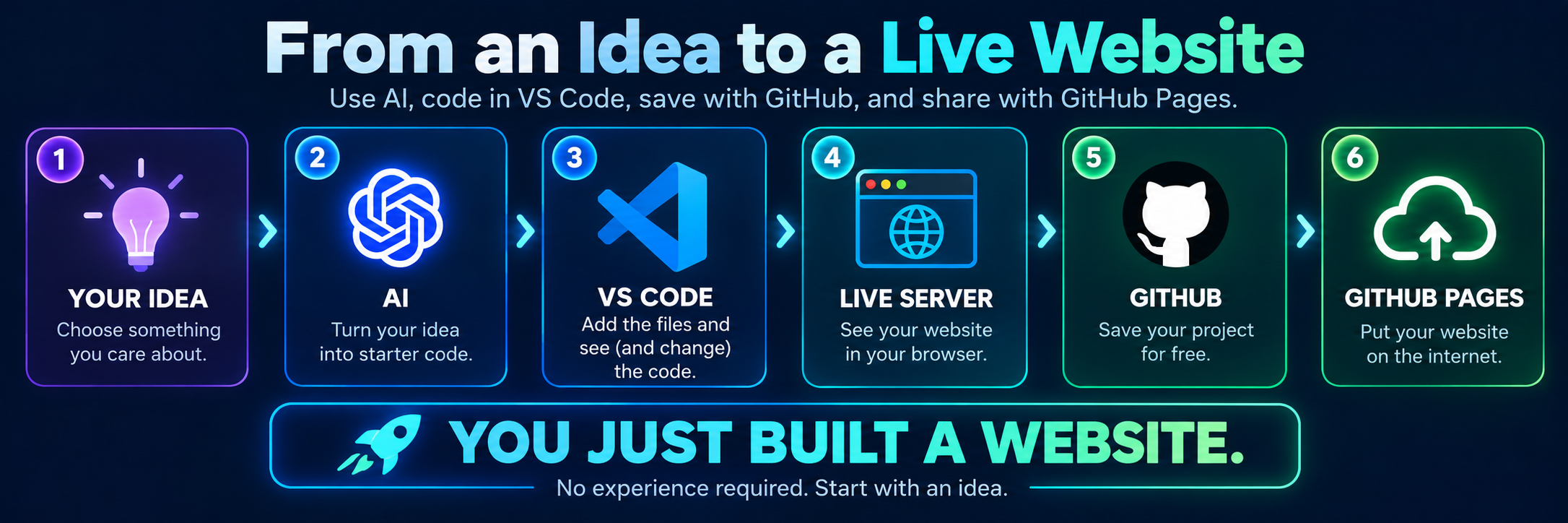
What Happens Next?
The prompt is only the beginning.
This is the path that turns your idea into something
other people can actually visit.
Remove the Barrier
Start for $0.
22 FREE TOOLS
Many of the same tools used by developers,
IT professionals, network engineers, and cybersecurity teams
ARE FREE.
Tap or click a category below.
Pick something that interests you and start experimenting.
Don't let that stop you.
Ask your school, teacher, counselor, or local library about computer access.
Several of the learning tools on this page work directly in a web browser.
Your First Investment
Curiosity costs $0.
Pick one career above.
Pick one free tool.
Spend one hour exploring it.
You don't have to decide what you want to do for the rest of your life.